How to Use Limit Orders in Crypto Trading (The Execution Skill I Wish I’d Mastered First)
Learn how to use limit orders in crypto trading to control prices, reduce slippage, and save on fees. Step-by-step tutorial with real examples from Binance, Coinbase, and Kraken.

In this article
Learning how to use limit orders in crypto trading was the single skill that transformed me from a reckless gambler into a disciplined trader. I’m not exaggerating. Before I understood this, I’d smash the market buy button like a slot machine lever. Then one night in 2021, a market order on a thinly-traded altcoin cost me $1,200 in slippage. That was my wake-up call.
If you’ve ever wondered why your fills look different from the price you saw on screen, or why savvy traders talk about “maker fees” like it’s a secret club, you’re in the right place. Understanding what slippage is and how it cost me $1,200 opened my eyes. Now I’m going to walk you through everything about limit orders – what they are, how to place them on major exchanges, and the advanced strategies that actually work.
What is a Limit Order (And Why It Matters More Than Your Entry Signal)
A limit order is simple: you set the exact price you’re willing to pay (or receive), and the trade only executes at that price or better. You’re in control. The market doesn’t dictate your entry – you do.
When you place a limit buy order at $60,000 for Bitcoin, you’re telling the exchange: “I’ll only buy if the price drops to $60,000 or lower.” Your order sits on the order book waiting for a match. No match? No trade. It’s that straightforward.
Limit Order vs Market Order: The Critical Difference
Market orders guarantee you’ll get filled immediately. Limit orders guarantee your price. You can’t have both – that’s the fundamental tradeoff every trader faces.
- Market Order: Executes instantly at whatever price is available. Fast but potentially expensive.
- Limit Order: Executes only at your specified price (or better). Patient but guaranteed price control.
A 2009 study by Brown, Koch, and Powers confirmed what experienced traders know intuitively: market orders offer immediacy but deliver less favorable prices. Limit orders give you price control at the cost of execution certainty.
Why I Stopped Using Market Orders After Losing $1,200 to Slippage
I still remember that night. I’d spotted what I thought was a breakout on a low-cap DeFi token. My finger hit market buy before my brain caught up. The order book was thin – really thin. My $8,000 order walked up through the asks like a bulldozer, filling at increasingly worse prices.
By the time my order fully executed, my average entry was 15% higher than the price I’d seen on my chart. That’s $1,200 gone before the trade even had a chance to work. The token dumped the next day anyway. Lesson learned.
That experience taught me something: your entry signal doesn’t matter if your execution is garbage. Limit orders are how you fix that.
How Limit Orders Actually Work (The Order Book Explained)
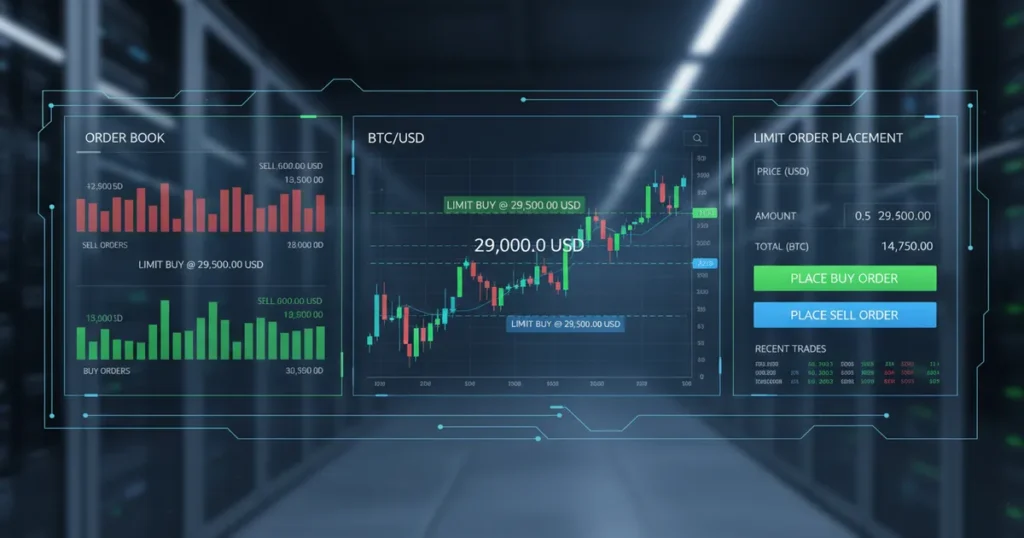
To really understand limit orders, you need to understand where they live. Every exchange runs an order book – a real-time list of all buy orders (bids) and sell orders (asks) waiting to be matched.
When you place a limit order, it goes into this book. Your buy order at $60,000 joins other bids. Your sell order at $65,000 joins other asks. The exchange’s matching engine constantly looks for overlaps. When a seller is willing to accept your bid price, boom – trade executes.

Here’s the key insight: limit orders add market liquidity to the exchange. This makes you a “maker” – you’re making the market by providing orders others can trade against. Crypto market makers do this professionally, but even retail traders like us get rewarded for it.
Most exchanges charge lower maker and taker fees for maker orders. On Binance, you might pay 0.1% as a maker versus higher taker fees. Coinbase charges around 0.4% maker fees. Those fractions add up fast when you’re trading actively.
How to Place a Limit Order Step-by-Step
The basic process is the same across every exchange, even if the interfaces look different. Before you start, make sure you understand crypto trading pairs – you’ll need to select the right pair for your trade.
- Navigate to the trading interface and select your trading pair (e.g., BTC/USDT)
- Choose “Limit” as your order type
- Enter your desired price
- Enter the amount you want to buy or sell
- Review the total cost and fees
- Click Buy/Sell to submit
Placing a Limit Order on Binance
Binance is where I do most of my trading, so I know this interface well. From the spot trading page, select “Limit” from the order type dropdown. You’ll see two fields: Price (where you set your target) and Amount (how much crypto you want). There’s also a percentage slider if you want to use a portion of your available balance.
Pro tip: Binance shows your estimated fee and total right below the order form. Always check this before confirming.
Placing a Limit Order on Coinbase Advanced Trade
Coinbase’s Advanced Trade interface puts the order form on the right side of the screen. Select “Limit” from the order options. Enter your limit price and size. Coinbase also lets you set time-in-force here, which we’ll cover in a moment.
I find Coinbase’s interface cleaner for beginners, though the fees are higher than Binance.
Placing a Limit Order on Kraken
Kraken keeps it straightforward. On the trading page, select “Limit” under order type. Enter your price and volume. Kraken prominently displays maker/taker fee estimates, which I appreciate. They also offer advanced options like post-only right in the order form.
If you’re comparing platforms, check out our guide to the best crypto exchanges for 2025.
Advanced Limit Order Features You Need to Know
Once you’ve mastered basic limit orders, these features will give you even more control.
Time-in-Force Options (GTC, IOC, FOK)
Time-in-force tells the exchange how long to keep your order active:
- GTC (Good Til Canceled): Your order stays on the book until you manually cancel it. This is the default on most platforms. I use GTC for most of my position-building orders.
- IOC (Immediate or Cancel): Fill as much as possible immediately, then cancel any unfilled portion. Useful for large orders where you want partial fills without leaving a visible footprint.
- FOK (Fill or Kill): All or nothing. The entire order must fill immediately, or it’s canceled completely. Mostly used by institutions and arbitrage traders.
Post-Only Orders (How to Guarantee Maker Fees)
Post-only is a setting that ensures your limit order goes to the book as a maker order. If your limit price would cause immediate execution (making you a taker), the order gets canceled instead.
Why does this matter? Maker fees are almost always lower. If you’re placing an order close to the current price, post-only guarantees you don’t accidentally pay taker fees.
Stop-Limit Orders (Combining Triggers with Price Control)
Stop-limit orders add a trigger condition to your limit order. You set a stop price (the trigger) and a limit price (the execution price). When price hits your stop, the limit order activates.
This is how most traders set protective exits while still maintaining price control. Learn more in our guide on setting stop losses in crypto trading.
Limit Order Strategies That Actually Work
Ladder Orders (Scaling Into Positions)
Ladder trading – placing multiple limit orders at different price levels – is how I build most of my positions now. Instead of trying to nail the perfect entry, I spread my risk across a price range.
Example: I want to accumulate $5,000 worth of Bitcoin. Instead of one order at $62,000, I place five orders:
- $1,000 at $62,000
- $1,000 at $61,500
- $1,000 at $61,000
- $1,000 at $60,500
- $1,000 at $60,000
If price drops through my ladder, I get a better average entry. If it only dips slightly, I still get partial fills. This approach according to research on transaction cost analysis consistently produces better outcomes than single-price entries.
Support/Resistance Level Entries
Technical traders place limit orders at key chart levels. If you’ve identified $58,000 as strong support for Bitcoin, a limit buy just above that level lets you enter if price retests it – without watching charts 24/7.
The key is setting your limit slightly above obvious round numbers. Everyone has orders at exactly $60,000. I set mine at $60,050 to get filled ahead of the crowd.
Catching Wicks and Volatility Spikes
Flash wicks happen in crypto. Price suddenly drops 10% on thin liquidity, then recovers within minutes. If you have limit orders waiting at those extreme levels, you can catch incredible entries that disappear in seconds.
I keep “wick catcher” orders active on major pairs about 8-12% below current price. Most never fill. But when they do, the entries are spectacular.
Common Limit Order Mistakes (And How I Fixed Them)
I’ve made every mistake in this section. Consider this my gift to you – learn from my expensive education. These are the same mistakes new traders make over and over.
- Setting unrealistic limits: Hoping Bitcoin drops to $40,000 when it’s at $65,000 usually means your order never fills. Set limits within reasonable range of current price and recent support levels.
- Forgetting stale orders: I once had a limit sell from three months earlier that triggered during an unexpected pump. Regularly audit your open orders and cancel anything no longer relevant.
- Using limits on illiquid pairs: On coins with thin order books, even limit orders can suffer from poor fills when partial orders execute at different levels. Check the order book depth before trading small caps.
- Ignoring fees in calculations: A 0.4% round-trip fee means your trade needs to move 0.4% just to break even. Factor this into your limit prices.
When to Use Limit Orders vs Market Orders
Both order types have their place. Here’s how I decide:
Use limit orders when:
- Building positions over time
- Entry timing isn’t urgent
- Trading in volatile conditions
- Working with illiquid pairs
- You want to guarantee maker fees
Use market orders when:
- You need immediate execution (emergency stop-out)
- Trading highly liquid majors with tight spreads
- Closing a losing position quickly
- Small order sizes where slippage is negligible
According to Kaiko Research, aggregate slippage costs exceeded $2.7 billion in 2024 – a 34% increase from the previous year. Binance Research found that retail traders experience 0.4% more slippage than institutional traders. The difference? Institutions use limit orders strategically. You should too.
Limit Orders and Risk Management
Beyond better execution, limit orders are a crypto trading psychology tool. When you set a limit order, you’ve made your decision at a calm moment. Price either comes to you or it doesn’t. No chasing. No FOMO buying at the top.
I remember the 2021 bull market. Everyone around me was market-buying whatever was pumping. I’d set my limits the night before, go about my day, and check later. Some filled, some didn’t. But I never felt that panic of “I have to buy right now.”
Combine limit entries with stop-loss exits for defined risk on every trade. Know your entry price. Know your exit price. Know your position size. Limit orders make this disciplined approach possible.
FAQs About Limit Orders in Crypto
Can my limit order partially fill?
Yes. If there isn’t enough liquidity at your price to fill your entire order, you’ll get a partial fill. The remaining amount stays on the book (with GTC) or gets canceled (with IOC). Check your open orders to see unfilled portions.
How long does a limit order last?
It depends on your time-in-force setting. GTC orders stay active until you cancel them – this could be days, weeks, or months. IOC and FOK orders execute immediately or cancel within seconds.
Do I pay fees if my limit order doesn’t fill?
No. You only pay trading fees when your order actually executes. Placing and canceling unfilled orders is free on virtually all exchanges.
Can I cancel a limit order?
Yes, anytime before it fills completely. Go to your open orders section and cancel with one click. Partially filled orders can also be canceled – you’ll keep the filled portion.
What happens if price gaps through my limit?
You get filled at your limit price or better. If you have a buy limit at $60,000 and price suddenly drops to $59,500, you’ll buy at $60,000. You won’t get the better price unless you had a limit there too – which is why laddering works so well.
Start Using Limit Orders Today
Mastering limit orders changed how I trade. The $1,200 slippage loss that sparked this journey was painful, but it taught me something valuable: execution matters as much as analysis. Maybe more.
Start small. On your next trade, try a limit order instead of market. Set it slightly below current price for a buy, slightly above for a sell. Watch how it works. Feel the difference between patient execution and desperate clicking.
Once you get comfortable, explore ladder strategies and time-in-force options. Build the habit of deciding your price before the market forces one on you.
If you’re still building your trading foundation, I’d recommend reading about how to read crypto order books – it’ll make everything about limit orders click. And if slippage has burned you before, my piece on what slippage really costs might hit home.
Questions about anything I covered? Drop a comment below – I read every one.